CA & Cloud Identity Governance: DigiCert’s 16-Month Archived Validation Breach (Passports & IDs) & "SkyW4lker x365 Sentinel" Device-Code PhaaS


Trust in enterprise security rests on two pillars: Certificate Authorities (CAs) that vouch for organizational identity on the web, and Single Sign-On (SSO) identity providers that guard corporate cloud tenants. Over the first week of November 2026, both pillars offered sobering lessons in configuration drift and protocol abuse. Major Certificate Authority DigiCert formally notified customers (following a November 1 disclosure on Mozilla’s Bugzilla compliance tracker) that an infrastructure migration error left an internal customer validation archive server exposed to the open internet for more than 16 months with an unauthenticated self-registration portal enabled—allowing threat actors to read archived customer contact records and, in some cases, passports, driver’s licenses, and utility bills. Simultaneously, threat researchers at ANY.RUN and enterprise SOCs warned of a surge in attacks by "SkyW4lker" (SkyW4lker x365 Sentinel), a sophisticated phishing kit that hijacks Microsoft 365 accounts by abusing legitimate OAuth 2.0 Device Code authorization flows.
1. Inside DigiCert’s 16-Month Validation Archive Exposure
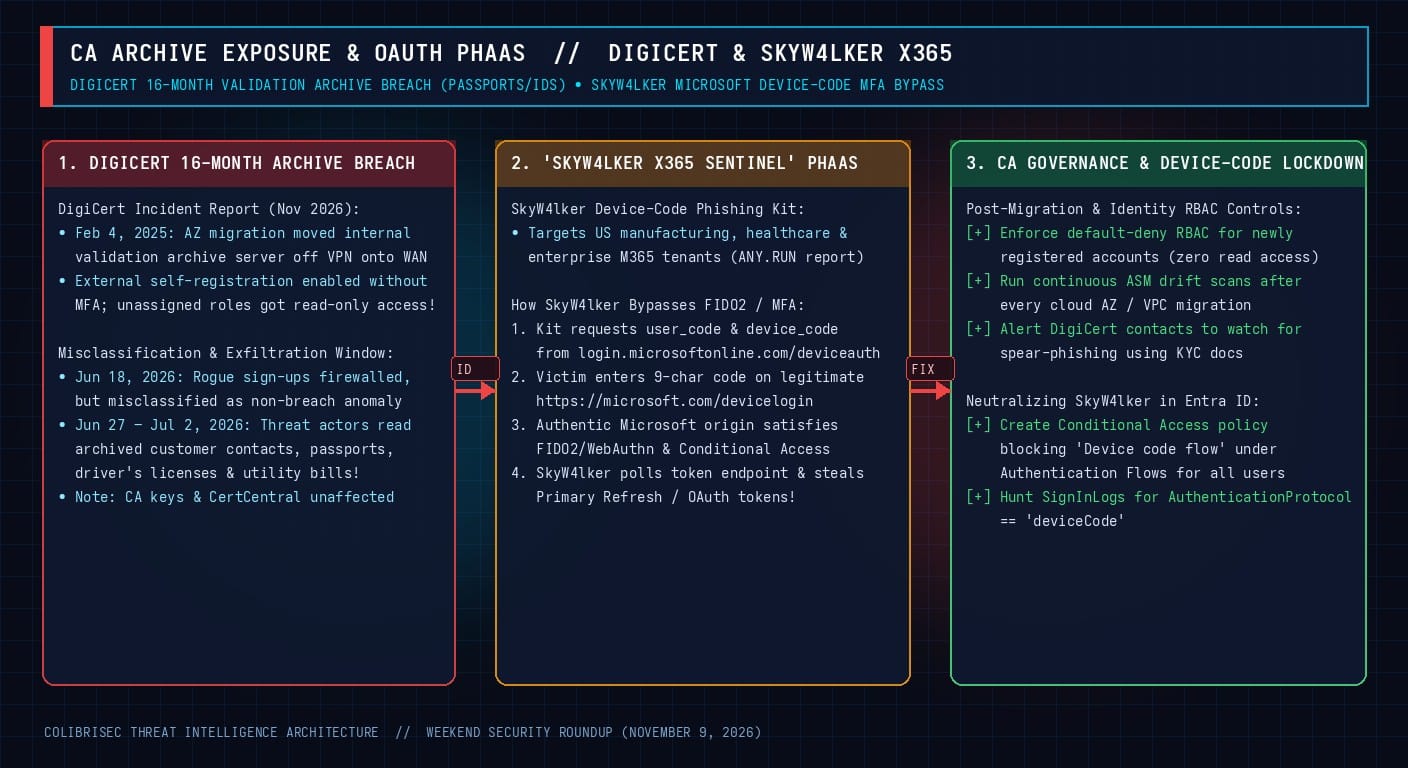
When enterprises or individuals apply for Extended Validation (EV), Organization Validation (OV), code-signing, or document-signing certificates, Certificate Authorities are required by CA/Browser Forum baseline requirements to collect and archive business and personal identity verification artifacts. While DigiCert’s core certificate issuance platforms (CertCentral, DigiCert ONE, and its HSM-backed signing keys) remained completely secure and untouched, its November 2026 incident report revealed a classic cloud-migration failure chain:
- February 4, 2025 — The Availability-Zone Migration Drift: During an infrastructure migration, an internal business server used to store archived customer validation records was moved from a VPN-restricted network segment into a different availability zone—accidentally removing the VPN boundary and leaving the application directly reachable from the public internet for over 16 months.
- Self-Registration Enabled + Over-Permissive Default RBAC: Compounding the network exposure, an account self-registration feature intended for other workflows became active externally. Unauthenticated internet users could register accounts without Multi-Factor Authentication (MFA), and due to an authorization flaw, newly created accounts with no assigned application role were inadvertently granted default read-only access to archived customer data repositories!
- June 18 – July 2, 2026 — The Misclassification Window: On June 18, 2026, DigiCert engineers noticed anomalous non-company accounts on the server and placed it behind a firewall to block further sign-ups. However, responders initially misclassified the issue as a benign account-creation anomaly, assuming unassigned accounts could not read files. Between June 27 and July 2, 2026, threat actors used previously created accounts to read archived data before the authorization flaw was finally patched on July 2 (confirmed via deeper forensics on October 19 and reported November 1).
While active TLS/code-signing certificates do not need to be revoked or replaced, affected customers whose passports, driver’s licenses, or utility bills were stored in the archive face heightened risk of targeted executive spear-phishing and identity fraud.
2. How "SkyW4lker x365 Sentinel" Bypasses MFA via OAuth Device Code Phishing
Meanwhile, enterprise SOC teams across U.S. manufacturing, healthcare, and technology sectors are battling SkyW4lker (SkyW4lker x365 Sentinel). Unlike Adversary-in-the-Middle (AiTM) kits such as Evilginx or VoidProxy—which proxy traffic through a fake domain and can be defeated by FIDO2/WebAuthn domain-bound passkeys—SkyW4lker abuses the legitimate OAuth 2.0 Device Authorization Grant (RFC 8628):
- Backend Code Request: When a target clicks a SkyW4lker lure (often disguised as a secure document, payroll update, or compliance notice), the SkyW4lker backend queries Microsoft’s legitimate endpoint (
https://login.microsoftonline.com/common/oauth2/v2.0/devicecode) and receives a short-lived 9-characteruser_codeand a hiddendevice_code. - Authentic Microsoft Login & MFA: SkyW4lker displays the 9-character
user_codeto the victim and redirects them to Microsoft’s real, authentic verification URL:https://microsoft.com/devicelogin. Because the user is interacting directly withmicrosoft.comandlogin.microsoftonline.com, even hardware FIDO2 security keys and passkeys succeed without warning! - Silent Token Polling: In the background, the SkyW4lker server polls
/oauth2/v2.0/tokenusing thedevice_code. The moment the victim approves the prompt, Microsoft issues validaccess_tokenandrefresh_tokencredentials directly to the attacker’s server.
Remediation & Entra ID Hunting Queries
// 1. Microsoft Sentinel / Defender XDR KQL Query to Detect SkyW4lker Device-Code Logins:
SigninLogs
| where TimeGenerated > ago(14d)
| where AuthenticationProtocol == "deviceCode"
| where ResultType == 0
| project TimeGenerated, UserPrincipalName, IPAddress, Location, AppDisplayName, DeviceDetail, UserAgent
| order by TimeGenerated desc
# 2. Mandatory Entra ID Conditional Access Policy to Neutralize SkyW4lker:
1. Navigate to Microsoft Entra Admin Center > Protection > Conditional Access > Policies.
2. Create New Policy: "BLOCK - OAuth Device Code Authentication Flow".
3. Users: Include "All users" (exclude only break-glass emergency accounts & dedicated conference-room device groups).
4. Target resources: "All cloud apps".
5. Conditions > Authentication Flows: Configure "Yes" -> Select "Device code flow".
6. Grant: Select "Block access".